Since oobo 1.0, every AI-assisted commit has been tagged with an anchor - who wrote what, which agent, what it cost. That was the foundation. But a tagged commit is still just a diff. It doesn't tell you why something was built, what was tried first, or what broke last time someone touched this code.
v2.0 closes that gap. Your commits become searchable engineering memory that agents can draw from. The result: agents that know your codebase history before they write a single line.
The problem with starting from zero
Every AI agent session starts with no memory. Your agent reads files, searches code, tries an approach, hits a dead end, backtracks, tries another. It has no idea that someone fixed this exact bug three months ago, or that the last time this module was modified it broke the test suite, or that there's a known pattern for this kind of change.
Developers carry this context in their heads. When they leave, it walks out with them. When an agent starts a session, it never had it in the first place.
We ran a controlled experiment to measure how much this matters.
What memory does for your agents
We tested the same agent (Claude Sonnet 4) on the same tasks (SWE-bench, real-world bugs from Django, scikit-learn, pytest, and 9 other major Python projects). One version got oobo's engineering memory. One didn't. Everything else was identical.
The cost difference was negligible ($0.55 vs $0.53 per task). Memory doesn't make agents more expensive - it makes them more effective at the same cost. The 5 additional bugs they fixed? Those would have required human intervention otherwise.
When there was a difference between the memory and no-memory run, oobo won 75% of the time. Three out of four.
Engineering memory via MCP
oobo mcp is a local MCP server that gives any AI agent access to your team's engineering history. Every session oobo captures feeds back into context that future agents can draw from. The more your team builds with AI, the smarter every agent gets.
Configured Cursor ~/.cursor/mcp.json
Configured Claude ~/.claude/settings.json
One command. From that point forward, your agents have access to five memory tools:
- •get_context - what your agent should know before touching these files: past sessions, decisions, known pitfalls
- •recall - search engineering history across all projects ("why did we choose Redis over Memcached")
- •ask - natural language questions about your team's engineering work
- •search - semantic code search across your codebase, runs locally
- •find_related - discover related implementations, callers, and patterns
The key insight: get_context is designed to be called at the start of every non-trivial task. It returns plain-text guidance scoped to the files the agent is about to modify. Past decisions, prior failures, patterns that worked. The agent gets institutional knowledge before it writes a single line.
Works with Cursor, Claude Code, Copilot, Windsurf, and any tool that speaks the Model Context Protocol. For teams that prefer not to run a local binary, there's a hosted mode at agentic.oobo.ai/mcp that serves the cloud tools without any local install.
Code search that stays on your machine
oobo search is semantic code search powered by sonar. Ask in natural language, get code results. Hybrid BM25 + vector search. No cloud, no API key, no indexing service. Everything runs on your machine.
src/auth/middleware.rs (0.94)
L23-45 pub fn validate_token(req: &Request) -> Result<Claims>
src/auth/jwt.rs (0.87)
L8-19 pub fn sign(claims: &Claims, key: &[u8]) -> String
This is also what powers the MCP search tools. When an agent calls search through MCP, it uses the same local sonar engine. Your code never leaves your machine.
From diffs to decisions
In 1.0, oobo answered "was this commit AI-assisted?" In 2.0, it answers "what led to this code?" Every time your agent takes a turn, oobo snapshots the workspace: which files changed, which tools were used, what the conversation looked like. When the work becomes a commit, the full chain of decisions is preserved.
Blame now traces a line of code back to the exact moment in the conversation that produced it - not just which commit, but which turn, which prompt, which tool call.
d22d5fe claude L12 let token = jwt::sign(claims)?; s:7c65#0
d22d5fe claude L13 set_cookie(res, &token); s:7c65#0
c00944e claude L14 audit_log(&user.id, "login"); s:7c65#2
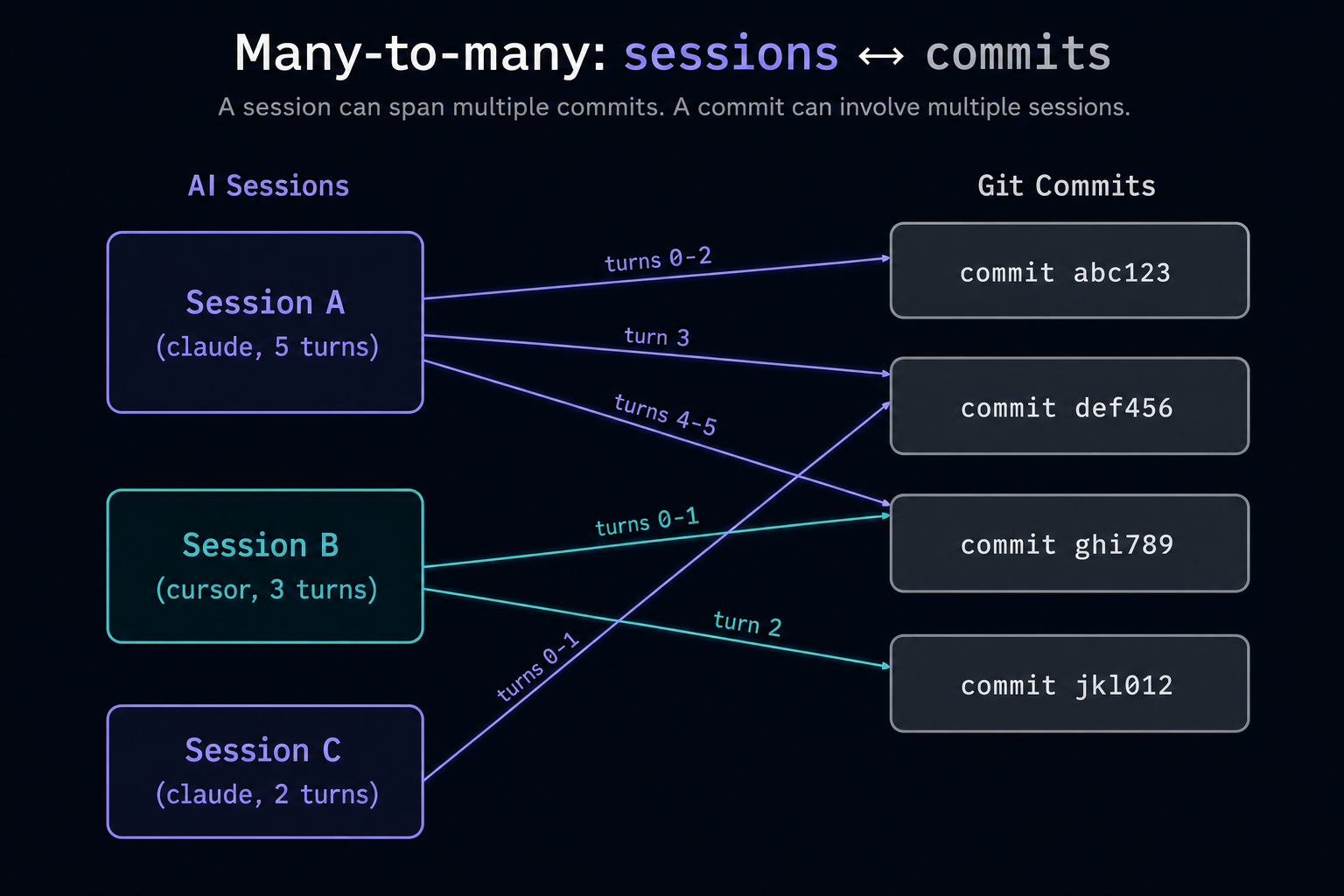
Sessions span commits. Commits span sessions. The real-world relationship between agent work and git history is many-to-many, and oobo 2.0 models it correctly.
Navigate your engineering history
Browse past sessions from the terminal. oobo goto jumps back to any commit or turn - your current changes are stashed automatically. oobo back returns you to where you were.
goto feat: add greet functions (changes stashed)
run `oobo back` to return.
# look around, see what the code looked like
$ oobo back
back to feat: add formal greeting
Useful when an agent went down the wrong path and you want to understand the sequence of decisions. Or when reviewing someone else's work and you want to see not just the final diff, but the journey that produced it.
Just git
v2.0 removes the local database entirely. Everything lives in git - same permissions, same access control, same tools. Active session state uses a lightweight file buffer that cleans itself up. Commit hooks complete in under a millisecond. No daemon, no external service, no signup required.
What else is new
- •Cross-repo tracking: when an agent edits files outside your repo, provenance follows
- •Subagent tracking: spawns and completions are recorded as turn events
- •Resuming a session continues the turn chain instead of starting over
- •All output commands accept --json and --agent for programmatic access
- •15 AI tools supported with automatic hook configuration